
Why Banks and Payment Providers Look at Your Website
When you open an account or start accepting payments, the bank, payment provider or e-money wallet has to find out who you are and what you do. This check is called KYC (know your customer) and KYB (know your business). In plain terms, they confirm that the company is real, its owners are known, and its activity is legal and understandable.
A website is the fastest way for them to see what the business looks like. If the address shows an empty placeholder saying “Coming soon”, the reviewer has nothing to compare with your application, and it may come back with questions. If the site describes your activity, shows what you sell and on what terms, and lists contacts and company details, the reviewer has fewer questions.
What a website does not guarantee
It is important to understand the limits up front. A good website removes “empty or template site” from the possible reasons for a refusal, but it does not replace company documents, does not influence the compliance department’s decision and gives no guarantees. The decision belongs to the bank or payment provider, and we never promise approval. Every organization has its own requirements, and they change, so below we link to official pages. Check the current terms before you apply.
If you do not have a company yet, start by choosing a country and legal form. There is a detailed breakdown in how to open a company in Europe.
Does Stripe Require a Website? What Stripe Checks
Stripe is a payment provider that lets you accept card payments on your site. It publishes an official website checklist for businesses (linked in the sources). These are its main points.
A clear description of what you sell
A visitor and a reviewer should immediately understand which products or services you offer. Prices or terms should be visible, and the description should match what you entered when you registered the account.
Ways to get in touch
Stripe’s checklist advises offering several ways to contact you, including direct ones: email, phone or live chat, not only a contact form. If a reviewer cannot find clear contact details, they may ask you to add them.
Policies
The checklist lists refund, shipping, returns and cancellation policies. Most businesses need them. If you have no delivery or physical goods (for example, only consulting), some policies are not required, but it is still better to describe your payment and cancellation terms.
Permitted business type
Stripe publishes a list of prohibited and restricted businesses. Some categories are not available at all, and some legitimate lines of business may be declined for risk reasons or partner requirements. Read that list before you apply.
Do you need a website at all?
“Does Stripe require a website” is a very common question. Stripe’s help center has a separate article on the website for account activation and on what to do if you do not have one. Our advice is not to count on exceptions: a working site speeds up the review and removes questions. If you plan to sell through an online store, also read how to open an online store.

Wise Business Account Requirements (and Revolut Business)
Wise Business and Revolut Business are electronic money institutions (EMIs) where account opening is done online. They do not publish a single list of website requirements, but their help pages show what they cross-check.
Wise Business
According to Wise’s help center, business verification has three stages: sign-up, business details and owner details. Business details include registration information, the legal and the actual address, the line of business, a link to a website or social media, information about all owners, and a document showing who owns or controls the company. Wise may ask for documents or check the details against a company registry. The requirements depend on the country and the company type, so see Wise’s help page for your country.
Revolut Business
Revolut checks that the company is fully registered and active: name, legal form, registered address, trading name, incorporation date, status and registration number. The documents depend on the country (a registry extract, incorporation documents). If Revolut cannot confirm the details in public registries, it will ask for a certified document. Business verification can take up to five working days.
What this means for your website
In the help pages cited here, neither Wise nor Revolut makes a website a mandatory condition (Wise asks for a website or social media link as one of the items), but both compare your description of the business with reality. The details on your site (company name, country, address, what you do) should match your application and documents, because discrepancies raise extra questions. So the site is not there “for show”: it is a public confirmation of your application.
What Your Website Needs: A Checklist for Banks and Payment Providers
Below is a general list that covers the expectations of most banks, EMIs and payment providers. It is not the official list of any single organization but a practical baseline. Check the specific terms with your own provider.
- What you do. A plain-language description of your business on the first page: who you sell what to. Not generic words like “innovative solutions” but specifics.
- Products or services and terms. What is included, how to order, what it costs (a price or a range), how payment and delivery work.
- Company name and country. The full legal name, legal form, country of registration and the registration number, if you already have one.
- Address and contacts. Email on the company domain (not a free mailbox), a phone or chat, an address. A virtual office will not do if you present it as your actual address.
- Privacy Policy. What data you collect and why. Especially important for customers in the EU.
- Terms of use or sale. Rights and obligations of the parties, payment, cancellation.
- Refunds and delivery. If you sell goods or paid services.
- Imprint for Germany and Austria. Legal information about the site provider, covered below.
- Cookie banner. If the site has analytics or ads.
- Secure connection and domain. The address starts with https, and the domain is registered to the company or its owner.
- A finished look. The site opens on a phone, has no placeholders and no sample text such as lorem ipsum.
- Consistency with the application. Name, country, activity and address match what you put in the application.
Test yourself with the checklist below: it calculates a score and suggests what to improve. The result is indicative and does not replace the check by the organization itself.
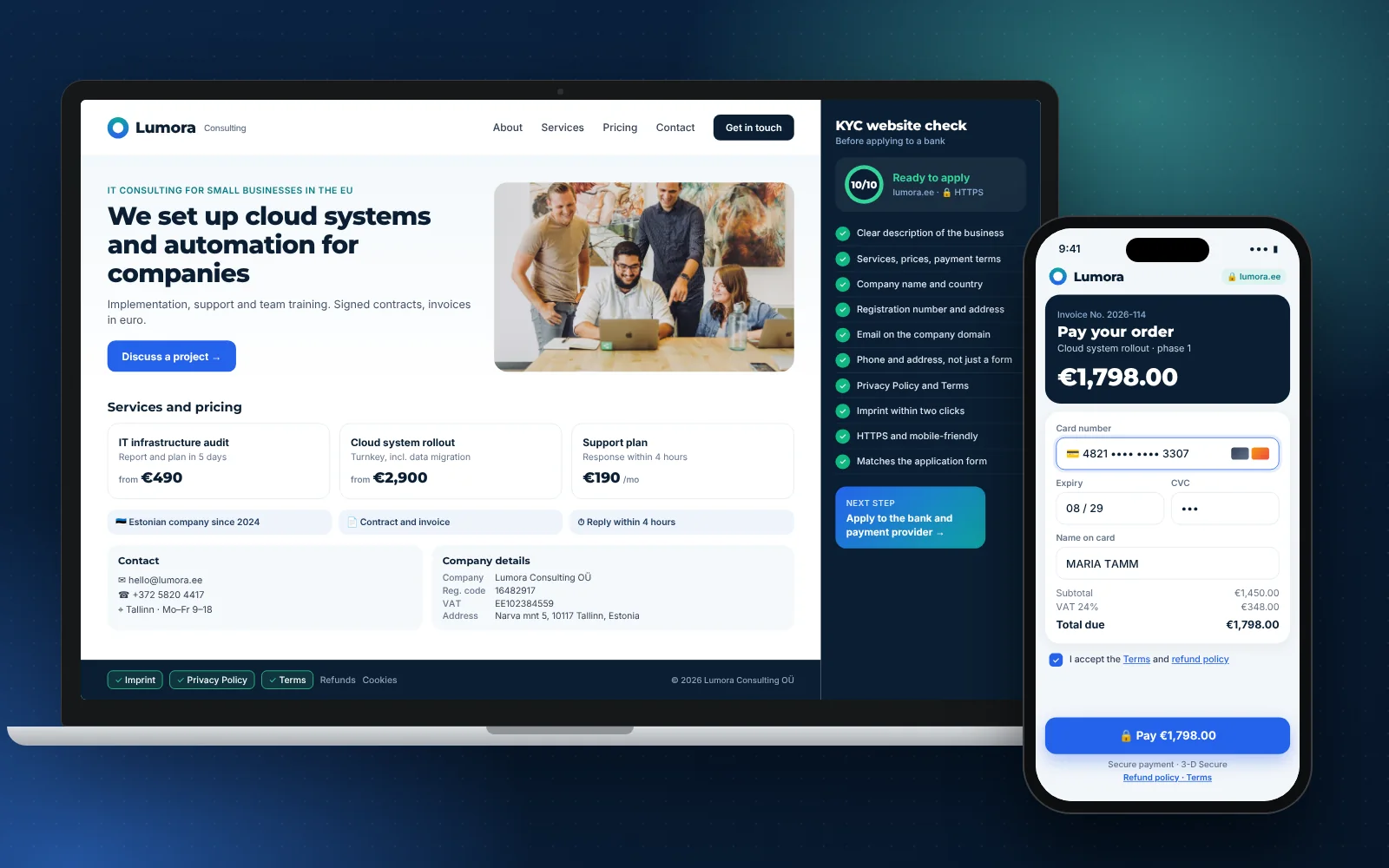
Will your website pass a bank and payment provider check?
- The first page clearly describes what the company does
- Products or services and terms are stated (price, payment, delivery)
- The full company name and country of registration are shown
- Company details or a registration number are shown (if the company is already registered)
- There is email on the company domain
- There is a phone, chat or address, not only a contact form
- There is a Privacy Policy
- There are Terms of use or sale
- There are refund and delivery terms, if you sell goods or paid services
- For Germany and Austria: there is an Imprint reachable in two clicks
- The site opens over https and looks fine on a phone
- There are no placeholders, borrowed texts or lorem ipsum
- The details on the site match the application and documents
- Your line of business is not on your payment provider’s prohibited list
Imprint, Privacy Policy and Terms: What They Are and Who Needs Them
Privacy Policy
A text explaining what data about visitors you collect (forms, email, analytics), why, how long you keep it and how a person can change it. For dealing with EU residents, the reference point is the GDPR. Almost any site with a form or analytics needs one.
Terms
The rules for using the site or buying from it: what you offer, on what terms, how to pay, cancel and get a refund. For a payment provider this is a key page, because it shows what the buyer can expect.
Imprint (Impressum)
A mandatory page for sites aimed at Germany and Austria. The provider’s name, address, contact details and registration data must be easy to find; the benchmark cited by the chambers of commerce (IHK) is access in two clicks, for example “Contact” and “Impressum”. If you work with the German market, this is not a formality. In the US and UK there is no Imprint, but a UK limited company is generally expected to show its registered name, number and registered office on its website, so confirm the exact list with your lawyer.
Who reviews these texts
We prepare page templates for the chosen jurisdiction. The final review is done by the client’s lawyer: we do not give legal opinions. That is more honest and safer for you. A good practice is to show a lawyer in your country the whole set at once: Privacy, Terms, refunds and Imprint, so the texts do not contradict each other or the company’s data. If you change your name, address or line of business, update the pages immediately, while the application is still under review.
What Most Often Raises Questions for a Reviewer
This is not refusal statistics. It is what we see in the organizations’ requirements and in the logic of the check. If you cover these points, there will be fewer extra questions.
- A placeholder or template site. No description, and someone else’s texts and photos.
- No contacts, or only a form. Especially important for payment providers.
- Discrepancies with the application. One line of business on the site, another in the application.
- No legal pages. Especially Privacy and Terms.
- A free mailbox in the contacts. Email on your own domain looks more reliable.
- It is unclear what you sell and for how much. No prices, terms or payment method.
- A questionable business category. A website will not change a list of prohibited activities.
If you are still planning what goes on the site and which pages you need, the article how to build a business website will help. And if the site is needed not only for verification but also to attract customers, read how much a website costs in 2026.
A Website in 24 Hours for Your Bank: What Is Included and What We Do Not Promise
The “Website in 24 hours” costs €599 and solves exactly this task: showing a living company to a bank and a payment provider. It is one page of up to 7 blocks with a custom design, containing a description of your business, country and company details, a request form, legal pages for your country (templates, with the final review by your lawyer), email on your domain and a secure connection. Afterwards you change texts and photos yourself in the editor.
Timeline conditions
The 24 hours count from the moment we receive the brief, the materials and access to the domain. If you have no domain, we help you choose and connect one, and you pay the registrar directly. Infrastructure at launch costs €0.
What we do not promise
We do not promise approval by a bank or payment provider, company registration timelines or decisions of government bodies. We are responsible for the website: it is ready 24 hours after we receive your materials and contains what reviewers usually ask for. Company registration is handled by a partner law firm (from €1,100), and in the “Opening a company in Europe” package the website costs €499 instead of €599.
Later, when you need a site that brings in customers, it can be grown into a business website, and we covered how to choose a contractor in how to choose a web agency.
What to Choose in Your Situation
- If the company is registered but you have no website. Order the “Website in 24 hours” and apply once the site shows your company details. It is the shortest path.
- If the company is still being registered. Build the site in parallel: country and name first, then the company details. See more in the article on choosing a country.
- If you already have a site but it is weak. Run through the checklist above and fill in what is missing. Most often these are contacts, policies and consistency with the application.
- If you will accept card payments on the site. Read your payment provider’s requirements and its list of prohibited activities before you apply.
- If you sell in Germany or Austria. Add an Imprint and have the texts checked by a local lawyer.
Whichever option you choose, remember that the website is only one part of the application. Ask your lawyer and the organization itself about documents, and check every step in your country for current rules.
Frequently asked questions
Do I need a website to open a business bank account?
Not always, but many banks and payment providers ask for a link to your website and compare it with your application. A working site with a description of the business, contacts and legal pages reduces the number of extra questions. The bank still makes the decision.
What does Stripe check on a website?
According to its official checklist: a clear description of products or services, prices and terms, direct ways to get in touch rather than only a form, and refund, shipping and cancellation policies where they apply. Stripe also does not work with a number of prohibited and restricted businesses.
What do Wise Business and Revolut Business need?
Wise asks for the company’s registration details, legal and actual address, line of business, a link to a website or social media, and information about the owners. Revolut checks the company’s registration and status against registries and documents. Your website should match these details.
Do I need an Imprint?
For sites aimed at Germany and Austria, yes: you need an easily accessible page with the provider’s details. The content depends on the company type and the line of business, so a lawyer should check it.
Can I apply while the company is still being registered?
Registration documents are usually required, so applications are filed after registration. You can build the site in advance and add the company details when they appear. Check the exact rules with your organization.
Does your website guarantee bank approval?
No, and nobody can honestly guarantee that. We build a site that contains what reviewers usually ask for. The decision depends on the bank, the documents and the line of business.
How much does a website for a bank cost and how long does it take?
The “Website in 24 hours” costs €599, and the clock starts when we receive the brief, the materials and access to the domain. You pay the domain registrar directly. Legal pages are templates, and your lawyer does the final review.
Can I use a free email address in my contacts?
Technically yes, but email on your company domain looks more reliable and matches your business name. We set it up as part of the website.
Sources
- Stripe: Website checklist for businesses · Stripe
- Stripe: Business website for account activation (FAQ) · Stripe
- Wise: How do I verify my business? · Wise
- Revolut Business: Incorporation details when setting up an account · Revolut
- IHK Ostwestfalen: Impressum guidance, § 5 DDG (in German) · IHK Ostwestfalen